Showing posts with label Anna Lifson. Show all posts

Tuesday, November 20, 2012

Creating Your Brand in SharePoint 2013 On-Premises or In the Cloud

Creating Your Brand in SharePoint 2013 On-Premises
or In the Cloud

Fresh from my first developer session at the SharePoint Conference in Las Vegas, "Creating Your Brand in SharePoint 2013 On-Premises or In the Cloud," I'm here to share a few of presenters Randy Drisgill and John Ross's tips for building a branded website in SharePoint 2013.

I was afraid entering the session that it would be code heavy, but was assured early on that there wasn't much code involved.
Agenda:
  • Intro Branding On Premises and Online
  • Low Effort branding
  • Medium Effort branding
  • High Effort branding
  • SharePoint Online

Introduction

The talk begins with examples of branding, showing Microsoft logos that have changed over the years. Branding applies to all of your company's marketing and websites and can involve images, logos, CSS, etc.
Microsoft offers two plans, each with separate branding capabilities: small business plan and enterprise plan. It is interesting to see that Microsoft has different abilities on branding in the different plans.

The approach to branding is Low, Medium, High and apparently there is a fair amount of change beginning with the Medium Effort. When you reach the medium effort, it's time to bring in design manager.

Low Effort Branding

Page editor in SharePoint 2013 is pretty much the same as it was in SharePoint 2010: it still has the ribbon where you can add video, images, web parts, etc. I usually think that content publishing is important to get branding to look nice and create a good user experience.

Some of the new capabilities include composed looks — the themes have evolved and enable you to create themes with custom images and colors, master pages, etc.

My observation is that the default themes are pretty ugly. They actually looks a bit like editing a WordPress theme, but with less functionality, you choose your theme location, image url’s, master page url, and more. You can choose which fonts can be available in the editor, not sure that it's useful, but it's an option.

Medium Effort Branding

Medium effort branding brings the design manager into play. The design manager can be found in the site actions, but you need to have publishing activated on the site in order to locate it.

Basically you get your HTML and CSS uploaded to the design manager, then apply SharePoint objects like search. SharePoint designer is optional when using design manager, you are free to use whatever web tool to create your branding: notepad, Coda etc.
  
 Both the master page and the page layouts can be edited with your web tools.

You can use the snippets gallery to get your navigation, breadcrumbs, search boxes, title, logo, etc. into the HTML design by copying the snippet code from the snippet gallery into the HTML code, then adding your own CSS and branding to it.

All of this can be done in a sandbox solution before publishing.

In your master page gallery folder you can create a subfolder to store all of your branding assets. Keep it nice and simple so that it is easy to understand and manage. A good practice is to document what you do as well; you may need it if your servers crash.

Before you start adding snippets, publish a version of the HTML file, this will give you a master page in the theme folder. When you've done this, you can go into the snippets gallery and change the options on the snippets you want, copy the snippets code and add to the HTML file in the place you want it. When you click save the HTML file will update the master file automatically. Pretty sweet!

Important to remember here is that you need to brand all of your site templates that you use, if you don’t you will get an unbranded page when you search or similar.


CSS can be applied with a script editor web part, or added to your master page. The design manager also applies the CSS automatically.

Randy and John showed us some CSS tools, like F12 developer, Firebug for Firefox and more. I usually use them all to make sure the site works in all browsers. What is nice with Firebug and other tools is that you can change the CSS on the live site and see what the effect will be. When you have it right you can just copy it into the CSS file.

Full Effort Branding

Planning for full branding is more about governance of branding: you need to have vision, documentation, test specifications and a strategy for branding.

You need to remember that SharePoint foundation doesn’t have design manager. Also remember that when you brand collaboration sites, then MDS (Minimal Download Strategy) is on. But when you edit with design manager it turns that off. So if you want MDS to get up the speed then you need to create you brand the traditional way.

The content search web part can now be branded with HTML/CSS/java scripts.

SharePoint Online

Public facing websites in SharePoint Online is different, they have added ribbon tools to speed things like change the footer text and more to speed website loading times, but this is a discussion for another article.

SharePoint 2013 Extranet Collaboration Manager by SharePoint Solutions Released as Beta

SharePoint 2013 Extranet Collaboration Manager by SharePoint Solutions Released as Beta

The Extranet Collaboration Manager beta for SharePoint 2013 has just been announced by SharePoint Solutions, and as the SharePoint Conference 2012 gathers steam, the tool is ready to download for deploying and managing SharePoint extranets.

ExCM Updates

As with so many software updates, the issue here isn't new features, simply compatibility. With the release of something as huge as SharePoint 2013, many organizations will be looking for ways to upgrade in as painless a way as possible. For those eager to set up extranets for their partners and vendors in a SharePoint 2013 environment, the Extranet Collaboration Manager beta is the latest option for bridging the functionality gap left by Microsoft.

To build an extranet in SharePoint 2013, there is some heavy lifting to be done. SharePoint Solutions is offering a simpler way to do this, and its ExCM for SharePoint Server 2013 and SharePoint Foundation 2013 offers features like helping solve login issues and facilitate simpler admin actions. (Fig 1)
Figure 1.
Manage extranets with the ribbon toolbar interface, and easily add a new user.


SharePoint Solutions has released new ExCM versions with each of the last two previous SharePoint upgrades. However, unlike when SharePoint 2010 debuted, SharePoint Solutions has not added any new features this time around.
ExCM for SharePoint 2013 offers the ability to deploy, secure and manage extranets, and also delegate routine admin tasks, register new users and support services to assist with set up.

SharePoint Conference 2012 Rundown

Day two of this year's Las Vegas based event is underway, and so far we've heard a bit about Microsoft's Yammer roadmap and an important new release from Webtrends analytics. We've also got some news from Axcelor on the Yammer front, and some special insights from SharePoint MVP Jennifer Mason.
The SharePoint Conference goes through Nov. 15, and there are still highlights to come this week from CMSWire. If you are at the event or if you need keynote highlights, we've got you covered.

Planning a Search Strategy

Planning a Search Strategy

 
The Olympic Games and US Presidential Elections come around every four years but SharePoint upgrades come on a three year cycle. There are still organizations using SharePoint 2007 and in the process of migrating to SharePoint 2010 and now we have SharePoint 2013 in all its glory.

Microsoft also seems to be hinting that in future there could be more frequent upgrades. Before long you will probably be able to major in Microsoft Upgrade and Migration Planning at most major universities.

My particular interest is in enterprise search and here I have to congratulate Microsoft on the progress it has made since the fairly terrible search functionality in SharePoint 2007. The company was also smart enough to go out and buy FAST Search and Transfer in 2008, but not quite smart enough about financial due diligence and building a sensible search technology strategy for itself and for SharePoint.

The Technology Story So Far

The immediate result was the arrival of FAST Search Server for SharePoint 2010, abbreviated to FS4SP. This took a lot of the components of FAST ESP 5.3, suitably modified to SharePoint 2010, and offered a substantial enhancement to SharePoint Search 2010 which itself was a significant leap forward from the search offering in SharePoint 2007.

Two issues immediately became obvious. First, many companies were convinced that they now had a licence for FAST ESP 5.3 and had no idea of the real state of affairs. Second, no one in the Microsoft partner community had any idea of how to get the best (or indeed anything at all!) out of FS4SP. My experience says that not that much has changed since launch unless the company has brought in external implementation expertise.

In 2010 Wrox published "Professional Microsoft Search" by Mark Bennett and his colleagues that covered all the Microsoft search products (including FAST ESP 5.3) in 450 pages. It is an excellent book because of the substantial amount of guidance it gives on the skills and management attention needed to get the best out of any search application.

It was not until earlier this year that Microsoft itself published "Working with Microsoft FAST Search Server 2010 for SharePoint," which runs to 450 pages just on FS4SP. There are so many omissions from this book that it would take me the rest of this column to list them, but the most notable are no references at all to using search logs to manage search performance and a total absence of any indications of the staffing requirements to support the product. It creates the impression that search implementation is a project, when at the minimum it is a program and in reality it is a journey without end.

The other significant problem is that (unlike the Wrox book) the book does not tell you what FS4SP does not do. A good example is document thumbnails, which out of the box are only supported for Word documents and Powerpoint files. Certainly there are some good third-party solutions (Documill comes to mind) but that misses the point.

Fortunately there are many excellent search implementation companies (Comperio, Findwise, Raytion and Search Technologies for example) that can really make FS4SP sing and dance but that inevitably adds to the implementation cost. Even then, any company running FS4SP probably needs a search support team of at least 3-4 people full time. A look at Sadie van Buren’s invaluable SharePoint benchmarking service shows search way down the list in maturity of implementation.

Planning for 2013

Now comes FAST Search Server for 2013. Why Microsoft retains the FAST branding defeats me, especially as ESP has now gone out of mainstream support. Oracle bought BEA in 2008 but does not still use the brand name!

There are quite a number of enhancements, some of which are going to need careful attention in the upgrade from SP2010 to SP2013. Nicki Borell is in the middle of a good set of blog posts on the changes.

Remember that the search integration partners are going to need to get up to speed. It doesn’t matter how much support they get from Microsoft, they need to get hands-on experience from an initial set of customers willing to let them establish good implementation practice. Microsoft might not get round to publishing the book of the product until 2015.

As with all search technologies, it is not a case of making the best use of what SharePoint 2013 offers, but whether these features are of value to users given the content being searched and the use that they will make of the search application. A Ferrari F12berlinetta is a very high performance sports car but where do you put the suitcase for even a weekend away? Maybe you should stick with your Aston Martin DB9.

Even if you are not immediately thinking of a migration to SharePoint 2013, starting work on a search strategy should be a very high priority.

Sunday, May 20, 2012

Favorite Things in SharePoint 2013

Favorite Things in SharePoint 2013


This year at the SharePoint Conference, Greg Brill and myself had the opportunity to present two express sessions. Our sessions were relatively short sessions, designed to quickly highlight key features with SharePoint 2013. One of the sessions was designed to cover five simple improvements in SharePoint 2013 that will make everyday tasks easier to complete. In this article we will be reviewing the five features that made it into my top five list!

1. Sharing Content

The first feature to make the list was Share. Within 2013 there are now easy ways for users to see who has access to the content they are reviewing, as well as a way for them to easily share the content with users. The Share features depend on the User Access Request settings being configured and they follow a process so that if a user doesn't have the permissions required to grant access that the request is first filtered through the site admin. This allows for users to quickly and easily share content with other users, but doesn't allow permissions to be granted on a whim.

With this new scenario a user really only needs to understand that they want to share data, click the link and enter the user's name. The admin will then get the request and then grant access or deny the request. 90% of the time in previous versions of the product it seemed like permissions where being managed correctly, but when that last 10% hit it could often result in a large mess that needed to be corrected.

Because of the risk, it was often required that only a small subset of users could manage permissions. This could cause issues because it became a large bottleneck of requests. With this new approach you get the best of both worlds because users can Share content on their own directly from the document or site and then the admin can intersect the request and ensure that permissions have been configured correctly. This is a great example of empowering the users to complete common tasks without assuming a great deal of risk.

2. New Task List Features

Second on the list was the features included in the new tasks list, specifically the timeline features. Gone are the days of a non-customizable Gantt list view that was difficult to read and process. Instead, with this release the SharePoint team and the Project Team worked together to provide us a way to view tasks in a configurable manner. An example is shown below in the image (Fig. 1):

Figure 1

 Any task in the list can easily be added to the Timeline view and then each task can be configured to have its own display style. All of the customization is done in the Ribbon menu that is only selected when you click on the timeline.

In addition to the easy customization options there are improvements with the way that the date format is displayed. SharePoint 2013 includes a setting for each column of the type data that allows for a display in what is referred to as the friendly display. This allows for dates to be displayed in very friendly terms such as “Tomorrow” and “Yesterday” or “A Few Second Ago”.

Having this enabled provides a very natural user experience. And finally, the last win to be highlighted in the task list is the fact that by default, without any configuration, conditional formatting is applied to the contents in the list. This allows for dates to be displayed in Red when they are past due.

3. Following Content

Third on our list of favorites is the ability to quickly follow content. For sites and documents within a site there is an associated Follow link that when used with add a link to the user’s personal pages, allowing them to easily return to the content at a later point in time. This functionality comes with the latest set of Social features that are available in SharePoint 2013.
 
But it is important to note that the following features goes beyond just saving a link to content. With the new Social features also comes the ability to Micro Blog, including the ability to tag a user in a post. When a user sees that they have been tagged in a post they are able to select an option allowing them to “Follow Up” on an item. Once they select this link to follow up a Task will be created for them in their personal page, which also will synchronize to their Outlook tasks (Fig. 2).


Figure 2.


4. Interacting with Search Results

The fourth item to make our top 5 was the ease of interacting with and working with the search results. With the integration of Office Web Apps into the search experience, users can easily see real time data of the content that has been returned in their search results. When a user completes a search they have the ability to see a full preview version of the document that they can interact with, without having to leave the search results. (Fig. 3)


Figure 3


5. Team Mailbox

The final feature in our top 5 is the ability to set up a group mailbox within a team site. Users are able to easily create a shared component in the site that allows for emails to be easily sent to a common shared address. Using these features allows for a team to have access to a shared email account that can easily be managed within SharePoint but still allow for users outside of SharePoint to interact with the team through standard emails.

Just a Few of the Many

This article summarizes just a few of the newest tips and tricks available within SharePoint 2013. The emphasis of this release is definitely about bringing refinement back to the basics. A new take on an old classic! One of the best selling points for moving to 2013 is looking at how all of the small wins and changes can have a big impact in your environment.


Friday, May 4, 2012

Nintex, Colligo, Workshare Add Mobile, Cloud, Collaboration Capabilities to SharePoint

Nintex, Colligo, Workshare Add Mobile, Cloud, Collaboration Capabilities to SharePoint


A variety of IT vendors debuted add-on solutions that bring functionality including mobile, cloud and collaboration features to SharePoint at last week’s SharePoint Conference held in Las Vegas, NV. Solution providers making noteworthy announcements included Workshare, Colligo, Nintex and Axceler.

Workshare Solutions Improve SharePoint Protection, Comparison, Collaboration

During the SharePoint 2012 Conference, secure document collaboration software provider Workshare demoed four solutions designed to ease the secure sharing and tracking of SharePoint documents outside an organization’s firewall. The four solutions are:
  • Workshare Point – This solution allows direct exchange of documents between Microsoft Office and SharePoint, allowing users to perform both Office and SharePoint document tasks with a single platform.
  • Workshare Professional 7 – Direct integration of Office document sharing and review capabilities including comparisons, version controls and metadata management with SharePoint enhances their effectiveness.
  • Workshare Protect 7 – This solution integrates SharePoint with Microsoft Outlook to automate real-time removal of, or warning about, email attachments of SharePoint documents that include sensitive or unnecessary data such as tracked changes, speaker notes, author names and last time of editing.
  • Workshare Compare 7 – This comparison tool is designed to streamline the review of SharePoint documents and PDFs and ease the identification of changes.

Colligo Enables Mobile SharePoint Content Management

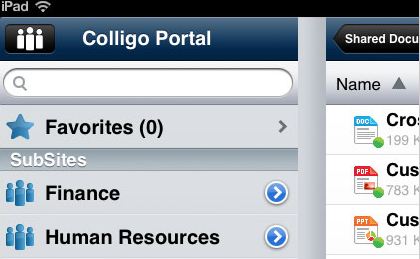
SharePoint app provider Colligo introduced Colligo Briefcase, a mobile app for secure SharePoint content management that runs on the Android, Mac OS X and Apple iOS platforms.  Targeting organizations with BYOD policies, Colligo Briefcase enables secure access to SharePoint on Apple iOS, Mac OS X, and Android, including full offline access to all features. (Fig. 1)
Figure 1

In addition, the app offers centrally-configured and managed SharePoint access across user devices and integrates email and metadata management across devices. (Figure 2)

Figure 2


Nintex Provides Mobile, Social, Cloud Capabilities

SharePoint workflow solutions provider Nintex is offering mobile, social media and cloud computing capabilities via its new Nintex Workflow 2013 and Nintex Forms 2013 modules which are aligned with the release of SharePoint 2013. Following are brief overviews of how the new applications will deliver functionality in each of these three areas.
  • Mobility – Nintex already supports basic mobile usage of SharePoint for Windows 8 and iOS users. New mobile features will allow users to create and respond to HR items and also support touch input, location data, camera photos and digital audio/video.
  • Social – The Nintex SharePoint workflow platform already supports major social media networks such as Yammer, Twitter and Facebook. Nintex says it is continuing to add social connectivity and provisioning to provide users with direct access to social media platforms and SharePoint social feeds from one dashboard.  
  • Cloud – Nintex has been offering cloud-based SharePoint services for two years, but is now allowing users to directly run SharePoint workflows in the cloud and use combined online/onsite workflows.


Axceler Enables SharePoint Change Management

Enterprise collaboration technology specialist Axceler released ControlPoint Change Manager, a solution designed to aid change management across SharePoint 2010 environments. ControlPoint ChangeManager allows SharePoint administrators to copy and restructure SharePoint sites and content, deploy and manage SharePoint workflows, and analyze SharePoint content type and web part usage.

An intuitive user interface allows management and restructuring of SharePoint content from any location, while granular control enables filtering, configuring and refining of content sets. In addition, content can be copied from one source to multiple destinations and users can employ Excel spreadsheets for online and offline editing and data transformation.


ControlPoint Change Manager will be generally available in early Q1 2013.  The introductory price will be US$ 5,100 which includes maintenance, with a pre-order promotion price of US$ 2,975 in effect now through December 15th, 2012. 

New SharePoint Development Model Raises Hopes, Questions

According to IDG News Service, the new SharePoint development model has “piqued the interest of ISVs and enterprise developers who create applications for Microsoft's enterprise collaboration server.” While the new standards-compliant model is designed to simplify the development and release of applications for the on-premise and cloud versions of SharePoint 2013, it is still not clear exactly what types of functionality Microsoft will support, or what types and price points of SharePoint apps will best fit within the promised SharePoint app store.

SharePoint 2013, Heavyweight Contender

As CMSWire reported in July, the upcoming release of SharePoint 2013 marks the entrance of the platform as a “heavyweight contender” in the WCM space. New WCM features for SharePoint include SEO tools, URL control, improved on page content management and content aggregation, enhanced mobility and multi-channel management, flexible meta-data driven Information Architecture (IA), search based user experiences (using FAST technology that is now fully integrated, catalog management and integrations with Independent Solution Vendors (ISVs).

But it SharePoint role in enterprise content management space where you see most third-party providers, like those above, offering enhanced capabilities. Governance and compliance are key areas of concern for many. And now even more organizations are looking for third party solutions that make working with SharePoint in cloud environments easier.

The four new third-party SharePoint solutions highlighted in this article are just a small representation of all the new applications showcased at last week’s conference. Expanded internal functionality and external partnerships give SharePoint the potential to rearrange the content management marketplace in the coming months.